Contact to 4us
Your comments are our important driving force ! 日本語
Thank you for coming 4us site
Application Series
AEI Keyboard URL Note
1Hand URL Free
AEI Keyboard Note Series
1Hand Keyboard SeriesEasy URL Free
Easy Keyboard SeriesPlease Share


Update : 22 Mar. 2019
Feed Back
Write any comments for us.
Please send us E-mail, address is here.
E-mail:
Thank you.
FAQ
Where can I find Japanese (Chinese,
Korean, Russian) keyboard on Easy Mailer ?
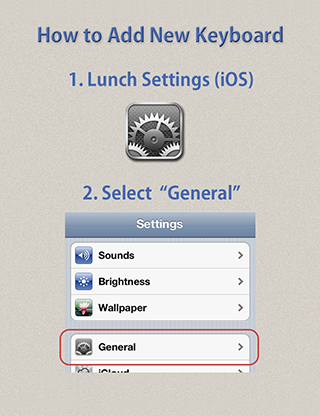
To turn on international keyboards other than English, Please change your iPhone or iPod touch Settings as follows:
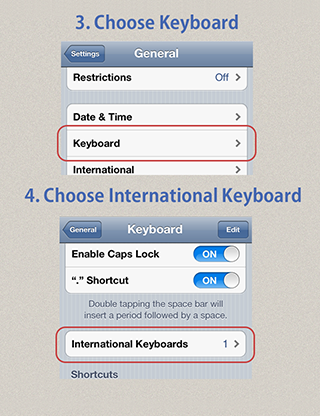
Launch "Settings" and go > General > Keyboard > International Keyboards
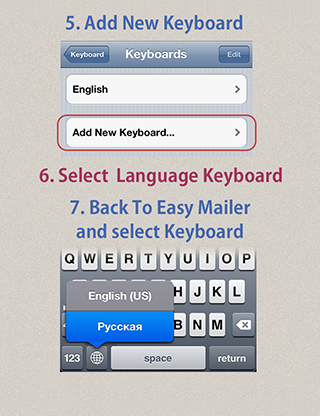
Then, turn on keyboards you want to use.
For Japanese and Chinese keyboards, please move further as you have more choices. (ex. QWERTY, Kana, Pinyin, Zhuyin, Russian)
Now you launch Easy Mailer and can switch keyboards by tapping
Globe/World key at the left of the space bar.
Privacy Policy Our Apps
No personal information is collected.
No names, no addresses, no phone numbers, no email addresses. No full sentences or phrases are transmitted by the app.
The app doesn't attempt to either obtain or use user identity in any manner.
No address book data is used or accessed by the app.
No location data is used by the app.
About Us
iPhone & iPod touch Application Development Team :
E.I. (Programming)
Keiichi Kobayashi
Toshihiro Nakane
Special Thanks :
Motohiro Kondoh, Kyouji Kondoh
Brandon Welti, Mihoko Hakata,
Torsten Klein, Thomas Lehn, Tiphaine de Mascureau
M&L Inc.